
Improve your classifier with LoRA
Train a small adapter on an A10, then compare accuracy and confidence after each epoch.

Beginner90 minutes, including trainingUpdated Oct 13, 2026
On this page
- Train Qwen on the classification dataset from the previous recipe.
- Understand which weights a LoRA changes and how the model learns an answer.
- Compare saved checkpoints on JevBench and choose which one to keep.
In the previous recipe, we created 2,000 training examples. Each example contains some input, a question, the possible answers and the correct answer. We will now use these examples to improve Qwen3.5-4B for classifying tasks.
An epoch is one pass through the training dataset: we will train for three epochs, saving the model's changes after each pass. This lets us check whether more training actually helps!
Load the dataset
Download Qwen Cookbook Classifier, the 2,000 training examples used for the charts in this recipe. This lets you start training without generating the dataset yourself. Its dataset card includes the sources and their licenses.
Set up a Python environment
Use Python 3.12 in your working directory:
python3.12 -m venv .venv
source .venv/bin/activate
The file is compressed with gzip; Python can read it directly:
import gzip
import json
from pathlib import Path
from urllib.request import urlretrieve

dataset_path = Path("qwen-cookbook-classifier.jsonl.gz")
url = (
    "https://huggingface.co/datasets/dmolenaars/qwen-cookbook-classifier/resolve/"
    "main/train.jsonl.gz"
)
urlretrieve(url, dataset_path)

with gzip.open(dataset_path, "rt", encoding="utf-8") as file:
    rows = [json.loads(line) for line in file]

print(f"{len(rows):,} training examples")2,000 training examplesUse your own dataset
import json
from pathlib import Path

dataset_path = Path("train.jsonl")
with dataset_path.open(encoding="utf-8") as file:
    rows = [json.loads(line) for line in file]
assert rows, "The training file is empty"
print(f"{len(rows):,} training examples")
Your generated examples will differ from the published dataset, so use your own baseline and checkpoint scores when choosing an adapter!
Encode the dataset
Before training, we convert the dataset into token IDs, the numbers the model takes as input.
Install PyTorch and Transformers, then load Qwen's tokenizer:
python -m pip install torch==2.13.0 --index-url https://download.pytorch.org/whl/cu130
python -m pip install transformers==5.15.0from transformers import AutoTokenizer
MODEL = "Qwen/Qwen3.5-4B"
tokenizer = AutoTokenizer.from_pretrained(MODEL)The following make_messages() function puts each row's document, question and answer options into a system and user messages, as well as the relevant labels. We'll use this format for both training and evaluation.
SYSTEM = (
    "Apply the supplied criterion to the supplied evidence. "
    "Choose exactly one listed option. Respond with only its uppercase letter, "
    "with no explanation or reasoning."
)

def make_messages(task):
    question = task["question"]
    labels = list(task["labels"])
    kind = question.get("type") if isinstance(question, dict) else None
    criteria = question["criteria"] if kind in ["choice", "noul", "score"] else None
    boolean = set(labels) == {"yes", "no"} and kind in [None, "noul"]

    if boolean:
        labels = ["yes", "no"]
    elif kind == "choice":
        labels = list(criteria)

    options = []
    for letter, label in zip("ABCDEFGHIJKLMNOP", labels):
        display = label
        if boolean:
            display = {"yes": "true", "no": "false"}[label]
            description = (criteria or {}).get(display, f"The proposition is {display}.")
        elif kind == "choice":
            description = criteria[label] or label
        elif kind == "score":
            description = criteria[int(label)]
        else:
            description = label
        options.append({"letter": letter, "description": display + ": " + description})

    criterion = question["instructions"] if criteria is not None else question
    if not isinstance(criterion, str):
        criterion = json.dumps(criterion, ensure_ascii=False)
    payload = {"evidence": task["state"], "criterion": criterion, "options": options}
    messages = [
        {"role": "system", "content": SYSTEM},
        {"role": "user", "content": json.dumps(payload, ensure_ascii=False)},
    ]
    return messages, labels
Encode the messages and the permitted answer tokens:
def encode(task):
    messages, labels = make_messages(task)
    prompt = tokenizer.apply_chat_template(
        messages, tokenize=False, add_generation_prompt=True, enable_thinking=False
    )
    input_ids = tokenizer.encode(prompt, add_special_tokens=False)
    letters = "ABCDEFGHIJKLMNOP"[:len(labels)]
    option_token_ids = [tokenizer.encode(letter, add_special_tokens=False)[0]
                        for letter in letters]
    return {"input_ids": input_ids, "option_token_ids": option_token_ids, "labels": labels}
input_ids contains the prompt tokens. option_token_ids tells us which answer scores to compare. Note that we keep thinking disabled so the classifier chooses its answer immediately!
Next, we will prepare all 2,000 examples for the training loop, and add the training target (the right answer out of all the answer options). Later, the loss calculation will use this target to correctly identify the correct answer.
train = []
for row in rows:
    example = encode(row["input"])
    example["target"] = example["labels"].index(row["target_key"])
    train.append(example)
Load Qwen on the A10
Next, we will install PEFT, the library that adds the LoRA, as well as Flash Linear Attention (FLA), which supplies GPU code for Qwen's recurrent Gated DeltaNet layers. Accelerate supports model loading and device management in this stack.
python -m pip install peft==0.21.2 accelerate==1.15.0 fla-core==0.5.2We will load the weights in BF16, which stores each number in two bytes. Some calculations still use FP32, a four-byte format with more precision.
Set the calculation options
Start with two environment variables. Libraries read these settings from the running process, so set them before importing FLA:
import os
import random

os.environ["TRITON_F32_DEFAULT"] = "ieee"
os.environ["FLA_CACHE_MODE"] = "disabled"

import torch
from transformers import Qwen3_5ForConditionalGeneration
import transformers.models.qwen3_5.modeling_qwen3_5 as modeling
from fla.ops.gated_delta_rule import chunk_gated_delta_ruleTRITON_F32_DEFAULT="ieee"asks Triton, the compiler used by FLA, to use standard FP32 precision for its FP32 matrix products when the kernel does not specify a precision itself. This avoids the default use of TF32, a faster GPU calculation mode that retains fewer significant digits.FLA_CACHE_MODE="disabled"skips FLA's lookup of saved GPU kernel configurations. A kernel is a small program that performs a calculation on the GPU.
Next, set the random seeds. A seed chooses the starting point for a sequence of random numbers. Keeping it fixed helps us compare runs with the same starting conditions!
random.seed(42)                   # Python's random-number generator.
torch.manual_seed(42)             # PyTorch's generators on CPU and GPU.
torch.cuda.manual_seed_all(42)    # Explicitly seed every CUDA GPU.
PyTorch uses random numbers when initializing the LoRA weights. In addition, the training loop also uses a separate random.Random(42) to shuffle the examples. Finally, manual_seed_all repeats the GPU seeding already covered by manual_seed.
Apply the FP32 precision settings to PyTorch as well:
torch.set_float32_matmul_precision("highest")
torch.backends.cuda.matmul.allow_tf32 = False
torch.backends.cudnn.allow_tf32 = Falseset_float32_matmul_precision("highest")keeps PyTorch's FP32 matrix multiplications at full FP32 precision.cuda.matmul.allow_tf32=Falseexplicitly disables TF32 for CUDA matrix multiplications. It requests the same behavior as"highest"above.cudnn.allow_tf32=Falsedisables TF32 for convolutions handled by cuDNN, a GPU library used by PyTorch. Qwen uses convolutions to mix information from nearby tokens.
Choose the GPU implementation
As we have discussed before, Qwen has both full-attention and recurrent layers. Use FLA's GPU implementation for the recurrent-layer calculation:
modeling.torch_chunk_gated_delta_rule = chunk_gated_delta_ruleThe assignment to modeling.torch_chunk_gated_delta_rule replaces the Transformers implementation of Qwen's chunked recurrent-layer calculation with FLA's implementation. FLA's autotuner tries different ways to divide the calculation across the GPU and chooses a fast one.
FLA chooses settings for your GPU and inputs. As this can change timings and answer probabilities, you should carefully evaluate the base model in this environment before training, as shown below.
Why can kernel settings affect the results?
Furthermore, GPU implementations can group calculations differently. Because computer numbers have limited precision, changing the calculation order can slightly change rounding and the resulting answer probabilities!
Load the weights
Qwen3_5ForConditionalGeneration is the Transformers class that loads Qwen's model and produces scores for the next token. Load the pretrained weights and move the model onto the A10:
model = Qwen3_5ForConditionalGeneration.from_pretrained(
    MODEL, dtype=torch.bfloat16, attn_implementation="sdpa"
).to("cuda")MODELselects theQwen/Qwen3.5-4Brepository on Hugging Face.dtype=torch.bfloat16loads the floating-point weights in BF16 to reduce GPU memory use.attn_implementation="sdpa"uses PyTorch's scaled dot-product attention interface for the full-attention layers. PyTorch selects a compatible implementation for the GPU. The recurrent layers use the FLA function selected above..to("cuda")moves the model onto the NVIDIA GPU. CUDA is the software interface PyTorch uses to run work there.
Finally, disable the model's generation cache:
model.config.use_cache = False
model.config.text_config.use_cache = False
During text generation, the cache holds attention keys and values and recurrent states so they can be reused for the next token. Because our classifier processes a complete prompt and only scores one answer token, it has no continuing response that needs those saved states. We can safely disable it!
Measure the starting point
Before changing any weights, we need to evaluate the base model on JevBench.
Clone and install JevBench:
If you already cloned jevbench-repo for the evaluation recipe, reuse it and skip the clone command.
git clone https://github.com/fstandhartinger/jevbench.git jevbench-repo
python -m pip install ./jevbench-repofrom jevbench.scoring import score_task
from jevbench.tasks import Task
tasks = []
for tier in ["original", "easy", "hard"]:
path = Path("jevbench-repo/datasets/public") / f"{tier}.jsonl"
tasks.extend({**json.loads(line), "tier": tier} for line in path.read_text().splitlines())The function below sends one tokenized prompt through Qwen. It returns the logits for the next token: one score for every token in the vocabulary.
def next_logits(row, training=False):
    ids = torch.tensor([row["input_ids"]], device="cuda")
    positions = {}
    if training:
        positions["position_ids"] = torch.arange(ids.shape[1], device="cuda").unsqueeze(0)
    output = model(
        input_ids=ids, attention_mask=torch.ones_like(ids),
        use_cache=False, logits_to_keep=1, **positions
    )
    return output.logits[0, -1].float()

def evaluate(questions, name):
    model.eval()
    records = []
    with torch.inference_mode():
        for task, row in zip(tasks, questions):
            logits = next_logits(row)
            scores = logits[row["option_token_ids"]].double()
            probabilities = dict(zip(row["labels"], scores.softmax(-1).cpu().tolist()))
            records.append({"id": task["id"], "probabilities": probabilities})
    path = Path("predictions")
    path.mkdir(exist_ok=True)
    (path / f"{name}.jsonl").write_text("".join(json.dumps(row) + "\n" for row in records))
    return records
We select the logits for A, B, C and the other permitted letters, then apply softmax to get their probabilities. This is the same calculation used for the classifier earlier! These probabilities add up to 100% across the allowed answers.
questions = [encode(task) for task in tasks]
base_predictions = evaluate(questions, "base")
We will load these predictions together with the trained checkpoints in the comparison section. The recorded A10 baseline answers 187 of 231 questions correctly, or 81.0%.
Add the LoRA
Let's talk a bit more theory. Model weights are the numbers used to turn an input into a prediction. Many are stored in matrices, which are simply grids of numbers. Full fine-tuning updates the original weights, but LoRA, short for Low-Rank Adaptation, keeps those weights fixed and learns an addition to them! The trainable additions together form an adapter.
Take an illustrative weight matrix W with 4,096 rows and 4,096 columns. That is 16,777,216 numbers. With full fine-tuning, every number can change during training!
This be wasteful: after all, there's within a model's weights, only a few are activated each time the model is invoked! For this matrix, a LoRA with rank 8 instead learns two smaller matrices:
- A has 8 rows and 4,096 columns: 32,768 numbers.
- B has 4,096 rows and 8 columns: another 32,768 numbers.
Multiplying B × A gives an update with the same shape as W. We add a scaled version of that update to the original weights' calculation:
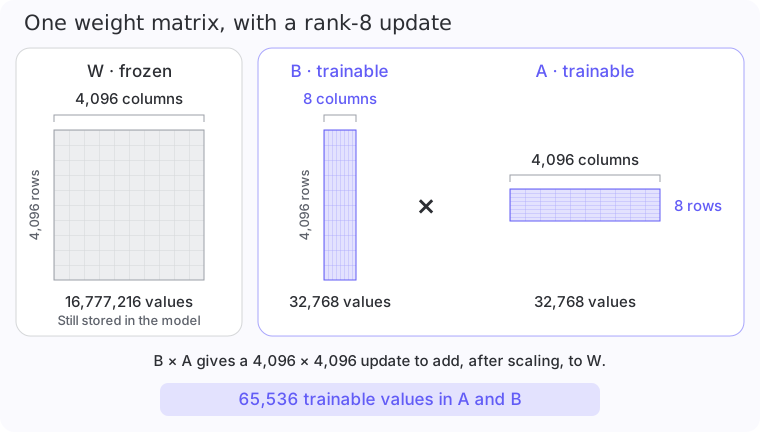
Training now updates only 32,768 + 32,768 = 65,536 numbers for this matrix. That is 256 times fewer trainable parameters!
The rank, r, is the shared dimension of A and B. Here, A turns 4,096 input values into 8 intermediate values, and B turns those into 4,096 output values. With r=32, the intermediate step has 32 values and the adapter has four times as many trainable parameters.
How do the two matrices change the layer's output?
For one selected layer, the input passes through the original weights and through the adapter. The two outputs are added:
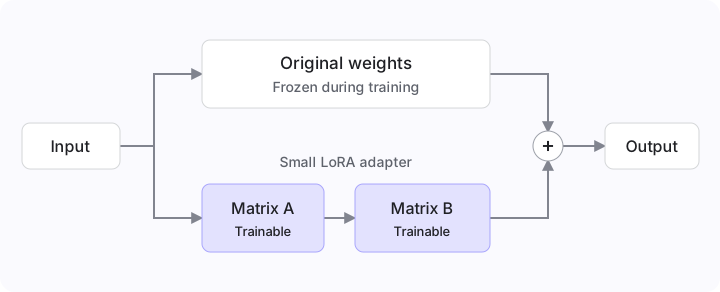
The matrix formula is W + (α / r) × B × A. Here, α (alpha) controls the strength of the adapter's contribution. The settings below use lora_alpha=16 and r=8, giving a multiplier of 16 / 8 = 2.
During training, PEFT applies the two small matrices in sequence. It can smartly calculate the adapter's output without building a full 4,096 × 4,096 update matrix each time!
Now, let's add a rank-8 adapter to the linear layers in Qwen's text model:
from peft import LoraConfig, get_peft_model

modules = [
    name for name, layer in model.named_modules()
    if isinstance(layer, torch.nn.Linear) and ".language_model.layers." in name
]
model = get_peft_model(model, LoraConfig(
    r=8, lora_alpha=16, lora_dropout=0,
    target_modules=modules, bias="none", task_type="CAUSAL_LM"
))
trainable = [parameter for parameter in model.parameters() if parameter.requires_grad]

print("Layers with a LoRA:", len(modules))
print("Trainable parameters:", f"{sum(p.numel() for p in trainable):,}")Layers with a LoRA: 248
Trainable parameters: 16,232,448Here is what each setting does:
r=8gives each adapter an intermediate dimension of 8.lora_alpha=16scales its output by16 / 8 = 2.lora_dropout=0keeps all adapter inputs during training. A value above zero would randomly set some inputs to zero as a way to reduce overfitting.target_modules=modulesadds adapters to the linear layers selected from Qwen's text model. Each selected layer gets its own A and B.bias="none"leaves the original bias parameters frozen. These are numbers some layers add to their output.task_type="CAUSAL_LM"tells PEFT we are adapting a model that predicts the next token. Our classifier uses that token to select an answer.
Keep these settings fixed for this recipe so we can focus on how training changes the answers. Across the 248 selected linear layers, the adapters contain 16,232,448 trainable parameters. That's a lot smaller than the 4 billion parameters we saw earlier!
Calculate the training loss
Suppose the model gives the correct answer a probability of 20%. We want training to increase that probability.
The loss measures how far the prediction is from the answer we want. For this calculation, the loss is the negative logarithm of the correct answer's probability. Using illustrative values:
import math

print(f"20% on the correct answer: {-math.log(0.20):.2f}")
print(f"80% on the correct answer: {-math.log(0.80):.2f}")20% on the correct answer: 1.61
80% on the correct answer: 0.22Giving the correct answer more probability makes the loss smaller. PyTorch's cross_entropy calculates this directly from the logits, including the softmax step.
def classification_loss(row):
    logits = next_logits(row, training=True)
    scores = logits[row["option_token_ids"]]
    target = torch.tensor([row["target"]], device="cuda")
    return torch.nn.functional.cross_entropy(scores.unsqueeze(0), target)
This trains the choice among the permitted answers. A rating question is handled in the same way: each rating level is an option, where a lower loss tells us the model is learning the training answers!
Why select the answer logits before calculating loss?
As we're training a simple classification model, our calculation will only compare A with B, C and the remaining permitted letters.
Train and save each epoch
We will process one example at a time on the GPU. This is the microbatch size. We accumulate gradients from 16 examples before updating the weights, giving an effective batch size of 16. A gradient essentially tells the optimizer how changing a weight would affect the loss.
There are 2,000 examples, so each epoch will jave 125 weight updates!
Set up the optimizer, which applies those updates. The gradient_checkpointing_enable flag sets, as the name implies, gradient checkpointing. This will allow us to save memory by recalculating some intermediate values during training.
model.gradient_checkpointing_enable(gradient_checkpointing_kwargs={"use_reentrant": False})
optimizer = torch.optim.AdamW(trainable, lr=5e-5, weight_decay=0.01, fused=True)

epochs = 3
batch_size = 16
total_steps = epochs * math.ceil(len(train) / batch_size)
warmup_steps = math.ceil(total_steps * 0.05)

def learning_rate(step):
    if step <= warmup_steps:
        return 5e-5 * step / warmup_steps
    return 5e-5 * (total_steps - step + 1) / (total_steps - warmup_steps)
The learning rate controls the size of an update. It increases for the first 19 updates, then gradually decreases for the rest of the run.
Run the loop below. For each group of 16 examples, it calculates the losses, accumulates their gradients with backward() and updates the adapter with optimizer.step().
import time

rng = random.Random(42)
step = 0
training_seconds = 0
history = []

for epoch in range(1, epochs + 1):
    order = list(range(len(train)))
    rng.shuffle(order)
    model.train()

    for start in range(0, len(train), batch_size):
        tick = time.monotonic()
        batch = order[start:start + batch_size]
        optimizer.zero_grad(set_to_none=True)
        losses = []

        for index in batch:
            loss = classification_loss(train[index])
            (loss / len(batch)).backward()
            losses.append(loss.detach().item())

        step += 1
        for group in optimizer.param_groups:
            group["lr"] = learning_rate(step)
        torch.nn.utils.clip_grad_norm_(trainable, 1.0)
        optimizer.step()
        training_seconds += time.monotonic() - tick
        history.append({"epoch": epoch, "step": step, "loss": sum(losses) / len(losses)})

        if step % 25 == 0:
            print(f"Epoch {epoch}, step {step}/{total_steps}, loss {history[-1]['loss']:.3f}")

    directory = Path("adapters") / f"epoch-{epoch}"
    model.save_pretrained(directory)
    tokenizer.save_pretrained(directory)
    evaluate(questions, f"epoch-{epoch}")
    print(f"Saved {directory}. Training so far: {training_seconds / 60:.1f} minutes")

Path("training-history.json").write_text(json.dumps(history, indent=2))
After each epoch, we're saving our checkpoint. Each checkpoint contains the adapter's weights at that point. As you can see, we also immediately evaluate the checkpoint: optionally, you can also choose to do this after all epochs have been trained.
Overall, you should expect around 24 minutes per epoch on an A10 or equivalent GPU card.
Compare the checkpoints
Let's grade the predictions with JevBench's score_task, the same scoring function used through OpenJudge in the evaluation recipe. We're count both correct answers and confidently wrong answers: incorrect choices assigned more than 90% probability.
prediction_dir = Path("predictions")
comparison = []

for name in ["base", "epoch-1", "epoch-2", "epoch-3"]:
    records = [json.loads(line) for line in (prediction_dir / f"{name}.jsonl").read_text().splitlines()]
    by_id = {row["id"]: row["probabilities"] for row in records}
    correct = 0
    confident_errors = 0
    hard_correct = 0

    for task in tasks:
        probabilities = by_id[task["id"]]
        grade = score_task(probabilities, Task.from_dict(task))
        correct += int(grade["correct"])
        hard_correct += int(grade["correct"] and task["tier"] == "hard")
        confident_errors += int(not grade["correct"] and max(probabilities.values()) > 0.90)

    comparison.append({"checkpoint": name, "correct": correct,
                       "hard_correct": hard_correct, "confident_errors": confident_errors})
    print(f"{name}: {correct}/{len(tasks)} correct, {confident_errors} confidently wrong")
This should produce something like the following:
Source: Qwen3.5-4B and each epoch checkpoint, trained and evaluated on one A10.
Source: Counts use probabilities over the permitted answers, before temperature calibration.
View data
| Checkpoint | Correct / 231 | Hard / 111 | Confident errors | NLL | Brier | Training minutes |
|---|---|---|---|---|---|---|
| Base model | 187 | 68 | 5 | 0.481 | 0.252 | 0.0 |
| Epoch 1 | 201 | 82 | 4 | 0.384 | 0.210 | 23.5 |
| Epoch 2 | 198 | 80 | 15 | 0.536 | 0.231 | 46.8 |
| Epoch 3 | 199 | 82 | 25 | 0.805 | 0.257 | 70.0 |
After the first epoch, accuracy noticeably increases from 81.0% to 87.0%. On the hard tier, correct answers increase from 68 to 82 out of 111! That's a great improvement for such a small dataset. The next two epochs do not improve on the first checkpoint, and confidently wrong answers actually rise from 4 to 25!
In other words, the more we train the model on our dataset, the more confident it gets - but that doesn't mean it'll be more correct! Therefore, we only keep the first checkpoint for this run.
Wrapping up
You have added a LoRA to Qwen3.5-4B, trained it on 2,000 examples and compared three checkpoints. In the recorded run, the first epoch improves JevBench accuracy by about six percentage points while keeping confidently wrong answers low.
For your own dataset, save checkpoints as you go and compare them using the same evaluation. Track confidence alongside accuracy so that a more certain model does not quietly introduce more confident mistakes.